You need a verified AI Blueprint account. You can begin with an eligible one-time free preview, a trial-credit coupon, or an active Starter or Plus period with enough AI credits for the action.
With email and password, accept the Terms, Privacy Policy, and Refund Policy, then open the verification link before signing in.
With Google, complete Google sign-in and accept the current legal documents when prompted.
The Dashboard keeps the normal idea input available. If your free allowance, package, or balance cannot cover the action, submitting opens purchase information and a link to My Blueprints.
The first-plan selector provides an IDR / USD choice. IDR uses Midtrans; USD uses PayPal. The same selector is available on Pricing and Billing.
The selector also accepts an eligible campaign code. One account can use only one campaign coupon in total.
Top-ups are not shown in the first-plan selector. They become available from Billing after a paid plan is active. Read Free Tier before relying on ordinary free-preview access.
1
Describe the product idea
On Dashboard, explain the product, target users, problem, and desired outcome. Add important constraints such as platform, region, compliance, integrations, or offline use.Write in Indonesian or English. AI Blueprint detects the idea language and uses it for generated documents.
2
Review the enriched idea
Read the Smart Requirement Summary. Confirm that the product definition matches what you intend to build.Do not approve a vague or incorrect assumption. Correct it while the context is still being formed.
3
Answer critical questions
Resolve decisions that materially change scope, actors, data, security, or delivery. A question may include a suggested answer, but the final decision is yours.
4
Approve the Idea Review / VPC
Sign only when the product context is accurate. This approval automatically starts document generation in the background, and you may safely close the tab.
5
Open an existing Blueprint when needed
Recent Blueprints appears as a separate section between the idea input and workspace activity. It shows up to four recent cards. Select View all to open My Blueprints.
6
Wait for generation to finish
Each document card shows a spinner while it is being generated. Project Health shows Generating until the current run finishes. Blueprint Summary updates these states periodically without a full-page refresh.
7
Review every current document
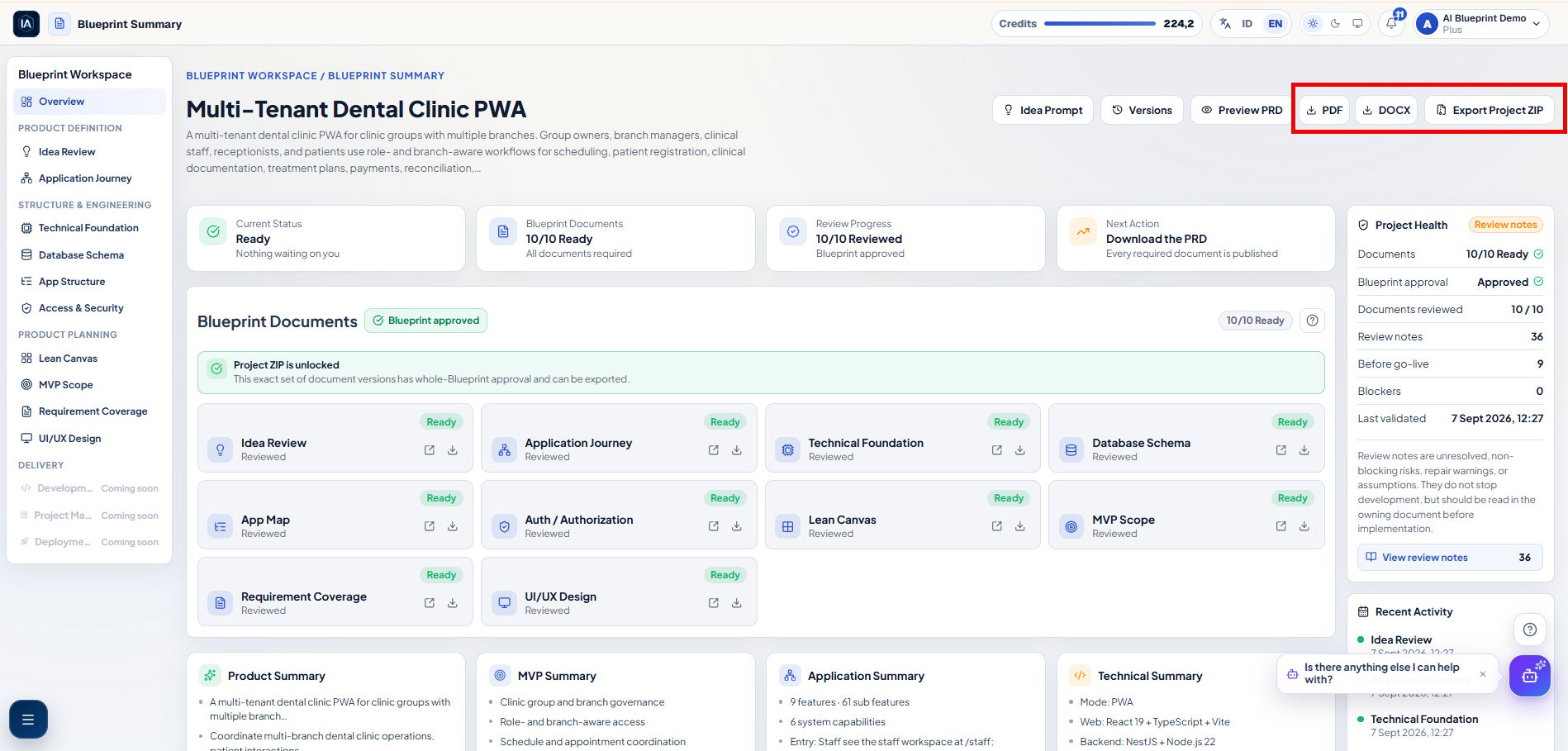
Use Blueprint Summary to inspect open items and project health. Open all 10 current document cards, including a Not Required stub. Opening a current document changes its review state from Not yet reviewed to Reviewed; it does not approve the Blueprint.
8
Approve the complete Blueprint
After all 10 current documents are Reviewed and no repair or blocker remains, select Sign Approve Blueprint in Blueprint Documents. This single action approves the current document set.
Include enough information to distinguish your product from a generic app:
who uses it and what each actor needs;
the problem and measurable outcome;
the main journey or transaction;
data, payment, file, notification, or external-system needs;
constraints such as mobile-only, offline-first, multi-tenant, or a launch deadline;
what is explicitly outside the first release.
Global approval applies only to the current document set. Regeneration, restore, or a new version can return affected documents to Not yet reviewed, revoke the current approval, and lock Project ZIP until you review and approve again.