

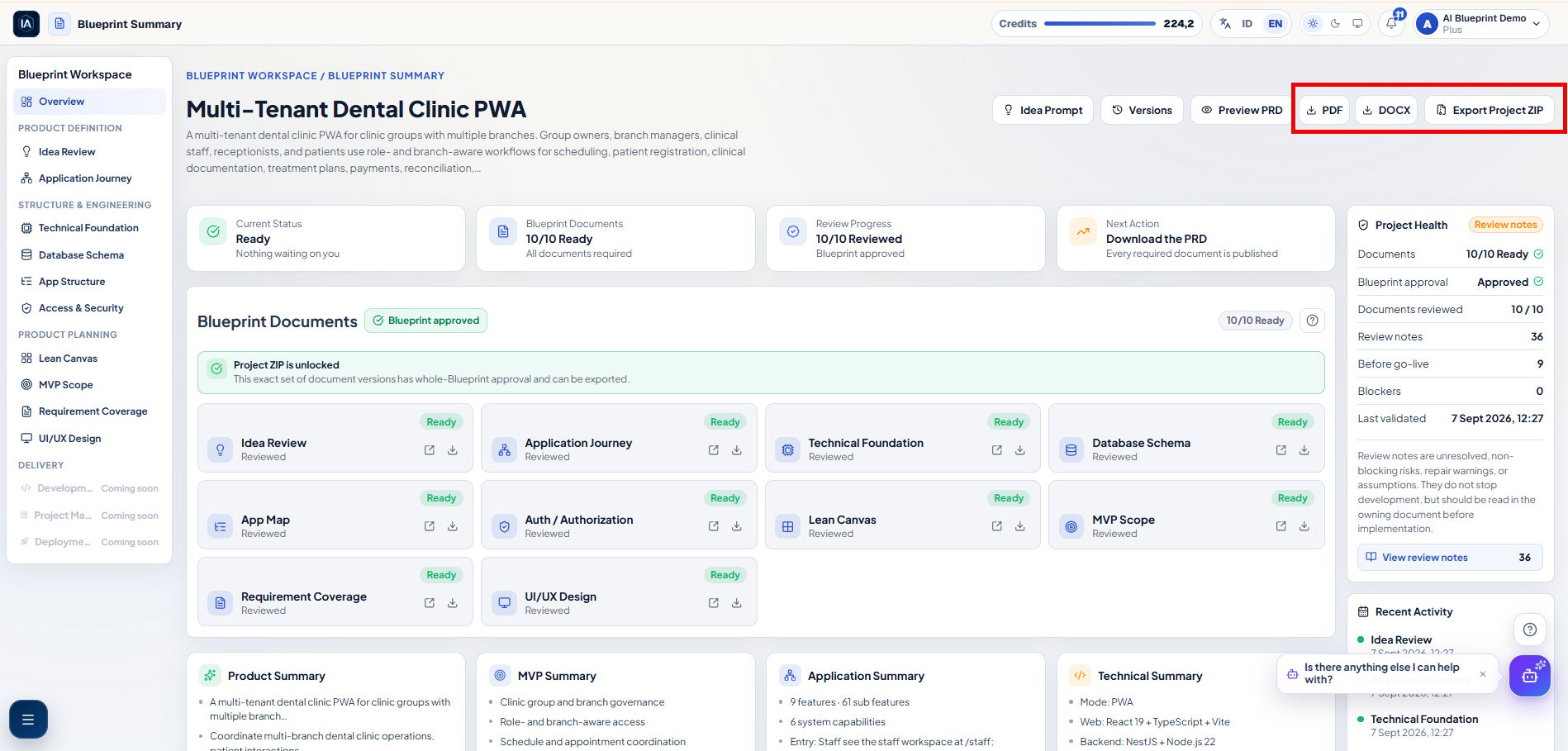
Download the approved package from Blueprint Summary with Export Project ZIP.
What the ZIP contains
The ZIP keeps the product decisions, document versions, implementation handoff, and agent workflow together. Project-specific filenames include a safe form of the Blueprint title. Use the actualmanifest.json in the archive as the authoritative inventory because conditional implementation-source artifacts can vary.
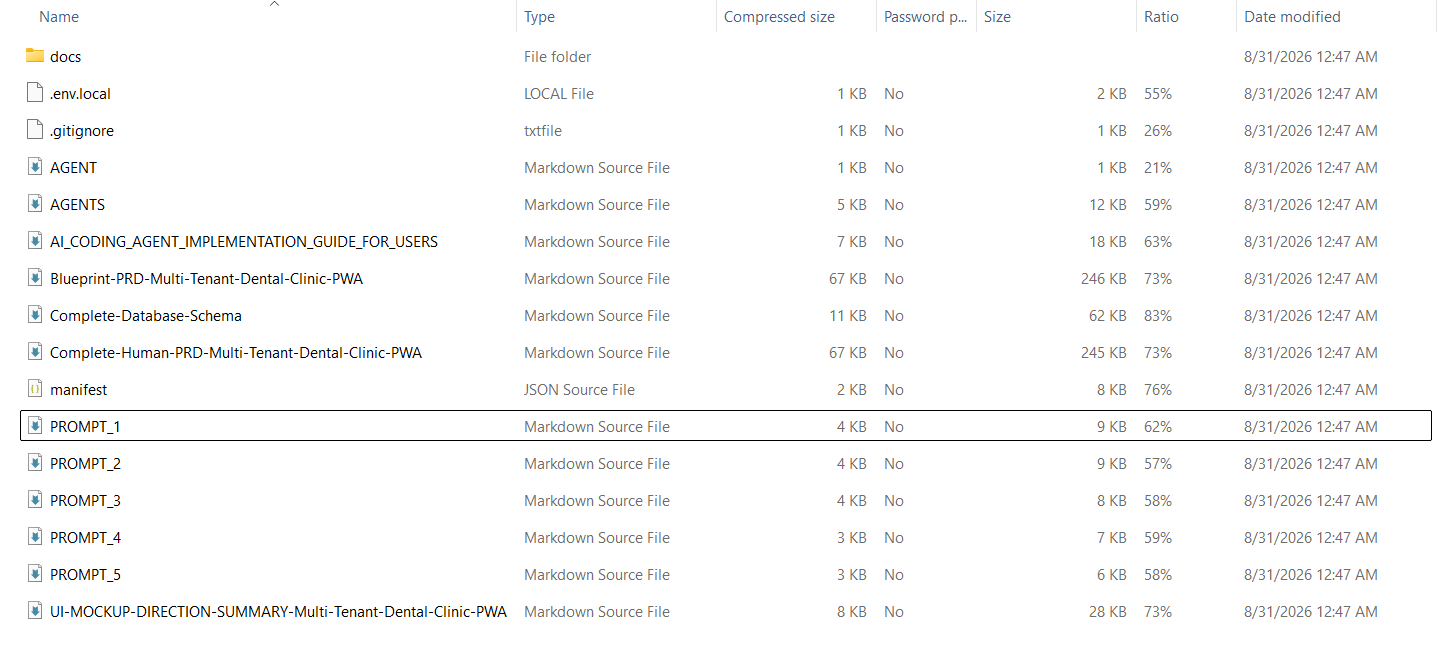
Example contents after extracting a Project ZIP. Project-specific names and conditional artifacts can differ in your package.
AGENTS item with type Markdown Source File is AGENTS.md, while a manifest item with type JSON Source File is manifest.json.
This is an English-language package example. An Indonesian package uses the Indonesian guide and may use Indonesian artifact names. The
manifest.json inside your own ZIP is always the authoritative inventory.Product and document files
What each example item is for
At the archive root, the implementation kit adds exactly eight Markdown files:
The root also contains
.env.local as a safe placeholder template and .gitignore to keep local secrets out of Git. Neither file is part of the eight Markdown-file implementation kit.
Project ZIP contains specifications and workflow files, not a finished application repository. The coding agent creates or reconciles source code after it has read the package and you have reviewed its plan.
How the language is selected
The implementation kit has reviewed English and Indonesian variants. Export selects one complete variant solely from the Blueprint/PRD document language:- an English Blueprint/PRD receives English agent files, prompts, and
AI_CODING_AGENT_IMPLEMENTATION_GUIDE_FOR_USERS.md; and - an Indonesian Blueprint/PRD receives Indonesian agent files, prompts, and
PANDUAN_IMPLEMENTASI_AI_CODING_AGENT_UNTUK_USER.md.
Existing Blueprints receive the same kit
This package format applies to both new Blueprints and Blueprints that were generated before the implementation kit was introduced. You do not need to regenerate the PRD or Blueprint documents just to receive the kit. Export the existing Blueprint again after it meets the current review and approval requirements. The new ZIP includes the language-matched eight Markdown files and.env.local template while preserving the consolidated PRD, Blueprint documents, and manifest. A ZIP already stored on your device does not update automatically.
Merge the package safely
1
Extract into a separate folder
Do not code inside the compressed archive. Extract it into a separate folder, inspect
manifest.json, then start with the localized implementation guide.2
Preserve existing project rules
In a new repository, place
AGENTS.md and AGENT.md at the root. In an existing repository, reconcile relevant rules with its current agent instructions. Do not overwrite human instructions, source code, configuration, or local changes.3
Copy the product inputs
Add the consolidated PRD and Blueprint documents to the target workspace so the coding agent can use them as the product source of truth.
4
Reconcile local configuration
If the repository already has
.env.local, preserve every existing value. Use the ZIP file only as a safe reference for missing names, and keep the resulting local file ignored by Git.5
Check Git
Use the repository’s current remote when one exists. Provide a Git URL only when the repository has no remote; never replace an existing remote without explicit approval.
AGENTS.md is the canonical agent contract. AGENT.md intentionally points to it so two copies of the working rules cannot drift.
Run the five prompts in order
Do not run Step 4 merely to make work appear faster. Keep one coordinator, explicit ownership, and a clear integration order whenever multi-agent mode is active.
Source-of-truth order for the coding agent
manifest.jsonidentifies the files, versions, and workflow included in this exact package.Blueprint-PRD-<Project>.mddefines approved implementation scope and acceptance criteria.- The complete database schema defines persistence and migration constraints.
- Files under
docs/provide focused domain detail and traceability. - The Human PRD supports review, while the UI Mockup Direction file supports visual exploration.
AGENTS.md, the localized implementation guide, and the five prompts control how the coding work is performed; they do not add product features.
Before the first coding run
- Extract the archive into a normal folder and read
manifest.json. - Read the localized implementation guide,
AGENTS.md, consolidated PRD, complete schema, and relevantdocs/files. - Confirm that existing repository rules, source code, configuration, and local changes will be preserved.
- Reconcile
.env.localwithout adding or exposing real secrets, then confirm that it remains ignored by Git. - Create or verify a Git baseline before the coding agent edits files.
- Give the coding agent
PROMPT_1.md. Review its product explanation, conflicts, risks, acceptance criteria, development foundation, and plan before usingPROMPT_2.md. - After each later prompt, run the repository checks, inspect the UI where applicable, review
git diff, and commit only verified work before moving to the next stage.